
How to create map quiz to engage your audience
Learn how to create map quiz with our guide that covers tools, design tips, and sharing strategies to captivate users.
To build a great map quiz, you need a tool that lets you define clickable areas on a map and tie questions to them. It's a simple idea: pick a map, write some engaging questions, and share it. But this simple formula is what turns a passive geography lesson into an active, memorable experience.
Why Interactive Map Quizzes Capture Attention
Ever notice how games like GeoGuessr can pull you in for hours? It’s because they tap into our natural curiosity and our love for a good challenge. An interactive map quiz works the same way, transforming a flat image into a dynamic playground for learning and discovery.
Instead of just reading about historical battles or ecological zones, users get to physically locate them on a map, which forges a much stronger mental connection. This is the key. It shifts the learner from being a passive observer to an active participant, a move proven to skyrocket information retention. This method is a cornerstone of gamification, a topic we dive into deeper in our guide on what is gamification in education.
From Classrooms to Marketing Campaigns
The power of a well-made map quiz goes far beyond the classroom. I've seen them used in some really creative ways.
Think about these scenarios:
- Museums: A museum could design a map quiz that guides visitors through an exhibit, prompting them to identify the origin of different artifacts.
- Travel Brands: A travel agency could launch a "Guess the Destination" quiz on social media, using beautiful photos pinned to a world map to build buzz for new travel packages.
- Corporate Training: A global company can use a map quiz to get new hires up to speed on the locations of its international offices and key markets.
Each of these examples uses geography to tell a story and connect with an audience in a meaningful way. It all comes back to the core principles of engaging content that make people want to interact.
The Growing Appeal of Interactive Learning
This isn't just a niche trend; the demand for interactive learning tools is exploding. The global online quiz platform market is booming, largely driven by the massive shift toward digital learning.
By 2025, the market is projected to hit $2.5 billion, with an estimated growth rate of 15% annually through 2033. This surge is fueled by the success of gamified learning, where interactive quizzes are essential for making education stick.
Key Takeaway: An interactive map quiz is more than a test. It's a powerful engagement tool that turns learning into an adventure. By making users active participants, you grab their focus, boost knowledge retention, and create an experience they'll want to share.
Choosing the Right Map Quiz Creator
Picking the right tool for your map quiz is probably the most important decision you'll make. It’s the foundation for everything that follows, from the design process to the final experience your players have. Some tools are built for speed and simplicity—perfect for a quick classroom activity. Others are powerhouse platforms designed for deep customization and professional use.
Embedded content
So, what are you trying to accomplish? Your goal should be the compass that guides your choice. An educator who needs a free, no-fuss tool with pre-loaded maps has very different needs than a marketer who requires detailed analytics and custom branding. Let's dig into a few options to see what's out there.
Tools for Different Goals
Not all map quiz creators are created equal. A simple, content-rich tool like Seterra is a teacher's best friend. It’s absolutely packed with ready-to-go geography quizzes you can fire up in minutes. The focus here is on content and ease of use, not on granular design control.
Then you have platforms like Mapme, which are built from the ground up for businesses. It's all about complete brand customization, tracking user engagement, and embedding slick interactive maps into a website for marketing campaigns. The priority is professional polish and data-driven insights.
And of course, there's the game-like approach. GeoGuessr has become massively popular by turning geography into an addictive challenge. It drops players into a random Google Street View location and asks them to pinpoint where they are.
This screenshot shows how a clean, immersive interface can make a simple geography challenge feel like a genuine adventure—a fantastic goal to aim for when you build your own quiz.
Comparing Popular Map Quiz Tools
To make the decision a little easier, here’s a quick breakdown of some popular tools. I’ve categorized them based on who they’re best for and what they offer.
| Tool | Best For | Key Features | Pricing Model |
|---|---|---|---|
| EarthChasers | Educators & Enthusiasts | 3D maps, unlimited free play, easy custom map creation | Completely Free |
| Seterra | Teachers & Students | Huge library of pre-made quizzes, multiple languages | Freemium (Ads) |
| GeoGuessr | Gamers & Casual Learners | Gamified Street View challenges, competitive modes | Freemium (Limited Plays) |
| Mapme | Businesses & Marketers | Advanced analytics, branding, lead generation | Subscription-Based |
Ultimately, the "best" tool is the one that fits your specific project. For educational content and creative freedom without a price tag, a tool like EarthChasers is a great starting point. For a more corporate or data-heavy project, Mapme might be the better fit.
Key Features to Look For
When you're comparing platforms, it's easy to get fixated on the price. But the features are what will truly determine what you can build.
Here are the non-negotiables I always look for:
- Customization: Can you upload your own map image? Change colors and add custom markers? If you’re building something unique—like a quiz based on a fantasy novel's map—this is absolutely critical.
- Question Types: Does the tool go beyond basic multiple-choice? Look for options like point-and-click, type-in-the-answer, or sequencing to keep things interesting. Variety is the key to engagement.
- Analytics: Can you see who took your quiz, what the average score was, or which questions stumped everyone? This data is pure gold for making your next quiz even better.
- Sharing & Embedding: How easy is it to get your quiz out into the world? A simple, copy-paste embed code is a must-have for integrating it into your website or learning management system.
A great tool doesn't just let you ask questions; it helps you tell a story. The best platforms provide the flexibility to build an experience that aligns perfectly with your educational or marketing objectives.
If you're looking to push beyond standard quizzes and create something truly memorable, you need a tool that can keep up. Here at EarthChasers, we built our custom map creator to provide the advanced features needed for crafting detailed and interactive worlds. The right platform empowers you to move from a simple test to an unforgettable journey.
Designing a Quiz People Want to Finish
Let's be honest: a great map quiz is more than just a test. It's an experience. The real trick is crafting something that feels less like a classroom exam and more like a compelling challenge or a miniature journey. This is what separates a quiz that someone bails on after three questions from one they can't wait to share with their friends.
It means thinking beyond the simple "click on the correct country" stuff. A truly memorable quiz often wraps its questions in a story or a multi-step challenge. Instead of just asking, "Where is the Eiffel Tower?", try something like, "Follow the path of the Seine River through Paris. Which famous landmark will you pass first?" See the difference? One is a simple recall task; the other is a small, interactive adventure.
Crafting Compelling Questions
The questions are the heart and soul of your quiz. To keep people hooked, you need variety and a nice sense of progression. A well-designed quiz should feel like it's building momentum, with questions that get a little more intricate or challenging as you go.
Here are a few ideas to get you started:
- Narrative-Driven Questions: Frame your questions inside a story. For example, "You're a 15th-century explorer sailing from Portugal. Click on the first major cape you'd have to round to reach India."
- Multi-Step Challenges: Ask users to find a few related spots in order. "First, find the source of the Nile River. Now, click on the capital city located at its delta."
- Visual Identification: Use satellite imagery to your advantage. Ask users to identify geographical features like mountain ranges or river deltas, not just political borders.
When you mix up these formats, you keep things fresh and stop the quiz from feeling repetitive. This is why map quiz apps have become such a huge deal in educational gaming—they nail the engagement factor. Just look at an app like World Map Quiz 2025; it dominated its App Store categories by serving up engaging content that keeps players coming back for more. You can dive into its impressive user engagement statistics and growth to see what's possible.
Choosing the Right Visual Foundation
The look of your map is every bit as important as your questions. The base map you choose sets the entire tone for the quiz. A beautiful satellite map is perfect for quizzes about natural wonders, giving you rich, real-world detail. A crisp political map is your go-to for questions about countries, states, and capitals. Or you could opt for a minimalist or custom-styled map to create a clean canvas where your markers and highlighted areas really pop.
Pro Tip: Your map's design should guide the user's eye, not distract it. Stick to a limited color palette and make sure any markers or highlighted regions have high contrast against the background. Clarity is your best friend here.
Once you have your base map, think about how visual cues can level up the experience. Color-coding regions, using custom icons for points of interest, or adding subtle animations can make your quiz feel more dynamic and polished. This kind of thoughtful design is a huge part of our guide on how to make learning fun.
Ultimately, you want to build a quiz that people feel compelled to finish. After getting your design locked in, it’s worth checking out some proven strategies to increase survey response rates—many of the same psychological principles apply to keeping someone engaged in a quiz. A quiz that’s both visually stunning and intellectually satisfying isn't just a learning tool; it's shareable content that people are proud to complete and pass along.
A Practical Walkthrough of Building Your Quiz
Alright, let's get our hands dirty and bring your quiz idea to life. We're moving past the planning stage and into the nitty-gritty of actually building this thing. To make it real, we'll work through a tangible example from start to finish: creating a map quiz on "UNESCO World Heritage Sites."
This project will serve as our guide, showing you how to handle each step—from choosing the right map to crafting feedback that actually helps people learn.
The whole process really boils down to three core stages: sourcing your map, adding your questions, and polishing the final product.
Here’s a quick visual of that simple workflow.
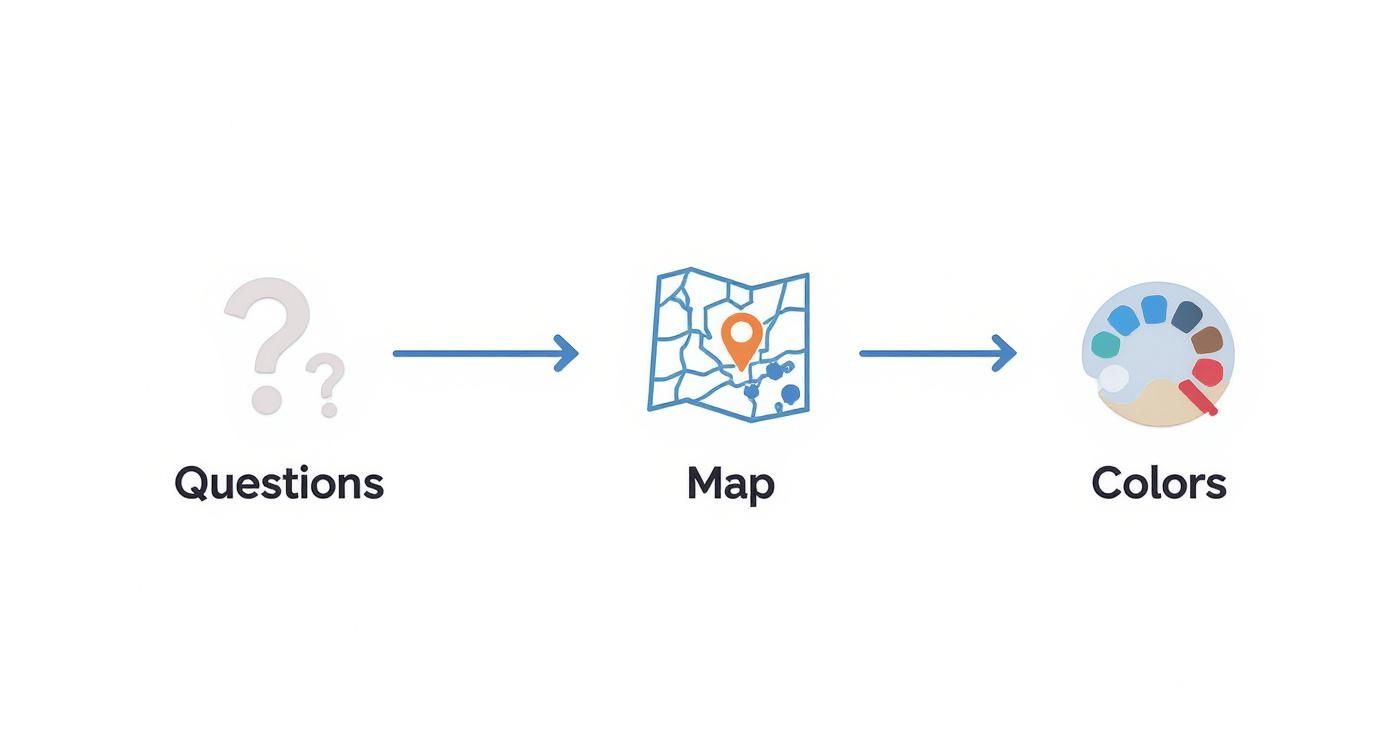
As you can see, a great quiz is born from the interplay between sharp questions, a clean map, and an intuitive design.
Sourcing and Preparing Your Base Map
First things first: you need a map. For our "UNESCO World Heritage Sites" quiz, a simple world map with clear country borders is the perfect canvas. You can find excellent, royalty-free maps on sites like Natural Earth or Wikimedia Commons. The goal is to find an image that’s high-resolution enough to avoid looking pixelated but clean enough not to distract from the quiz itself.
Once you’ve got your map file, you’ll upload it into your quiz-making tool. Now comes the crucial part: defining the clickable areas. For our UNESCO quiz, each heritage site needs to be a distinct point of interest. Using your tool’s editor, you’ll place a marker or draw a small shape over each location, like Machu Picchu in Peru or the Great Wall of China.
Expert Tip: Name your clickable regions logically as you create them (e.g., "MachuPicchu_Peru" or "GreatWall_China"). Trust me on this one. This simple habit will save you a massive headache later when you’re trying to link questions to specific spots on the map. It keeps everything organized and error-free.
Adding Questions and Scoring Logic
With your map's interactive zones ready, it's time to build out the actual quiz content. Let’s start with a classic point-and-click question: "Click on the location of Angkor Wat, the famous temple complex in Cambodia." You’ll then link this question directly to the clickable area you just defined for Angkor Wat. Easy.
But don't just stop there. Variety is key to keeping people hooked. Mix it up with a multiple-choice question. For example, you could highlight four different locations on the map and ask, "Which of these sites is the Acropolis of Athens?" This forces players to think differently.
Next up is scoring and feedback. Most quiz tools make this pretty straightforward:
- Assign Points: Decide what a correct answer is worth. Maybe you make tougher, multi-step questions worth more points.
- Write Feedback: This is where you can add real value. Instead of just "Correct!", try something more engaging. For a right answer, you could add, "That's right! The Acropolis contains the remains of several ancient buildings of great architectural and historical significance, the most famous being the Parthenon."
- Provide Hints: A wrong answer is a teaching moment. Ditch the simple "Wrong." Instead, guide the user. For instance, "Not quite! That's the Colosseum in Italy. The site you're looking for is located in Greece." This turns a mistake into a genuine learning opportunity.
Refining the User Experience
The final touches are all about making the quiz feel polished and intuitive to use. You need to put yourself in the player's shoes. Are the instructions crystal clear? Are the clickable markers big enough to tap easily on a phone? Small frustrations can cause people to give up and leave.
Finally, think about the results screen. Don't just show a score. Add a brief summary of their performance or a clear call to action. You could encourage them to share their score on social media or challenge a friend to beat it. This one small feature can dramatically boost your quiz's reach and impact.
By focusing on these practical steps, you can build a map quiz that isn't just a test of knowledge—it's a genuinely fun and memorable experience.
Sharing and Promoting Your Map Quiz

You've built a fantastic map quiz. Great! But let's be honest—that's only half the job. Now, you need to get it in front of people, and that’s where the real magic happens.
Thankfully, most quiz tools make the technical side easy. The go-to method is embedding the quiz right on your website, blog, or into a Learning Management System (LMS). This usually just means copying a small bit of code—an iframe—and pasting it into your page. It’s a simple trick that keeps users on your site, making for a much smoother experience.
How to Get Clicks on Social Media
Just dropping a link onto social media is a recipe for being ignored. To actually get people to stop scrolling and click, you have to frame your quiz as something more than just a quiz.
Think about what makes it special and lead with that hook.
- Throw Down a Gauntlet: Frame it as a challenge. Something like, "We bet you can't ace our Roman Empire quiz. Only 10% of people do," is way more compelling than a flat "Take Our New Quiz."
- Show, Don't Just Tell: Post a sharp screenshot or even a quick screen recording of the quiz. A good visual is non-negotiable for catching someone's eye.
- Tag the Right People: If your quiz covers a specific region or topic, tag relevant accounts. Think tourism boards, educational influencers, or geography-focused groups. This simple step can explode your reach.
This isn't just about getting a few extra clicks; it's about tapping into the massive world of interactive digital entertainment. The global games market, which includes learning tools like map quizzes, is on track to hit $522.46 billion in revenue by 2025. That’s a huge audience hungry for engaging content. You can find more details about the growth of the global games market on Statista.
My Takeaway: Don't just share a link; share an experience. When you promote your quiz, focus on the challenge, the fun, and the story behind it. People are more likely to click on something that promises an adventure, not just a test.
Use Analytics to Build an Even Better Sequel
Okay, your quiz is live and people are taking it. Now the real learning begins—for you. Don't skip this part! User data is where you find the gold that will help you make your next quiz even better.
Most quiz platforms give you a dashboard with key stats. From my experience, these are the three numbers that matter most:
- Completion Rate: What percentage of people who start your quiz actually finish it? If it's low, you might have a question that’s too frustrating or the whole thing is just too long.
- Question-Specific Data: Where are people getting stuck? If one question is tripping everyone up, it might be worded poorly or just be way too hard for your audience.
- Average Score: This is your quick-glance difficulty meter. If everyone is scoring 100%, it’s a good sign that you can ramp up the challenge next time.
Digging into this data gives you a direct line into your audience's head. You learn what they know, what holds their attention, and how to make your next map quiz an even bigger hit.
Common Questions About Making Map Quizzes
When you first dive into creating a map quiz, you’ll probably run into a few common questions right away. I see them pop up all the time. Getting these sorted out early will save you a ton of headaches and help you build something you're actually proud of. Let's walk through some of the big ones.
Where Do I Even Start? (Especially for Free)
This is the classic first hurdle: what’s the best tool to use if you're on a budget? For educators or hobbyists just getting their feet wet, platforms like Seterra and Lizard Point are fantastic starting points. They’re packed with pre-made quizzes and offer basic customization without costing a dime.
But what if you need more control, or you want to use your own custom map? You can get pretty creative without spending any money. A surprisingly effective method is to combine Google My Maps with a simple form builder. It takes a bit more manual setup to link your questions to specific map locations, but it gives you a ton of flexibility.
Will My Quiz Work on a Phone?
Another huge concern is mobile compatibility. It's a valid question—how do you make sure your quiz is just as slick and playable on a tiny phone screen as it is on a big desktop monitor?
The good news is, most modern quiz platforms are already built with responsive design in mind. They automatically adjust to different screen sizes. That means your main job is to think about the user's experience.
Key Takeaway: Always design for the smallest screen first. That means making your clickable areas—your "hotspots"—large enough for someone to tap easily with a thumb. Stick to high-contrast colors and simple, readable fonts. This ensures your quiz doesn't just work on any device, it looks great, too.
Can I Use My Own Custom Maps?
What if you're building a quiz for a fictional world, like from a video game or a fantasy novel? Absolutely. Many of the more advanced tools, including Mapme and StoryMapJS, are built to handle custom map uploads.
This is perfect for projects that go way beyond standard geography. Just make sure your map image is in a common format like a PNG or JPG, and you're good to go.
How Do I Know if People Actually Like It?
Finally, how can you tell if your quiz is a hit? Tracking engagement is everything. Most professional-grade quiz tools come with a built-in analytics dashboard, and you’ll want to pay close attention to it.
Look for a few core metrics:
- Completion rate: How many people finish the whole thing?
- Average score: Are people finding it too easy or too hard?
- Toughest questions: Where are most users getting stuck?
This data gives you direct insight into what’s working and what isn’t, which is exactly what you need to make your next quiz even better.
Ready to build your own immersive world? EarthChasers provides the tools you need to create stunning 3D maps and engaging geography challenges for free. Start your adventure today at https://earthchasers.com.